LLMs.txt Maker
Build your site's llms.txt straight from the WordPress dashboard — no file to upload, nothing to keep in sync.
Free, GPLv2. Unzip and upload from Plugins → Add New.
What is llms.txt?
llms.txt is a Markdown file at the root of your site. It gives AI tools a short, clean map of your important pages, with a one-line description next to each link. Reading that map costs an AI far less context than reading your full HTML.
llms.txt is a community proposal, not an official standard. Some AI companies publish their own llms.txt, but no major AI provider has committed to reading it. It costs almost nothing to have one.
What the plugin does
The settings screen
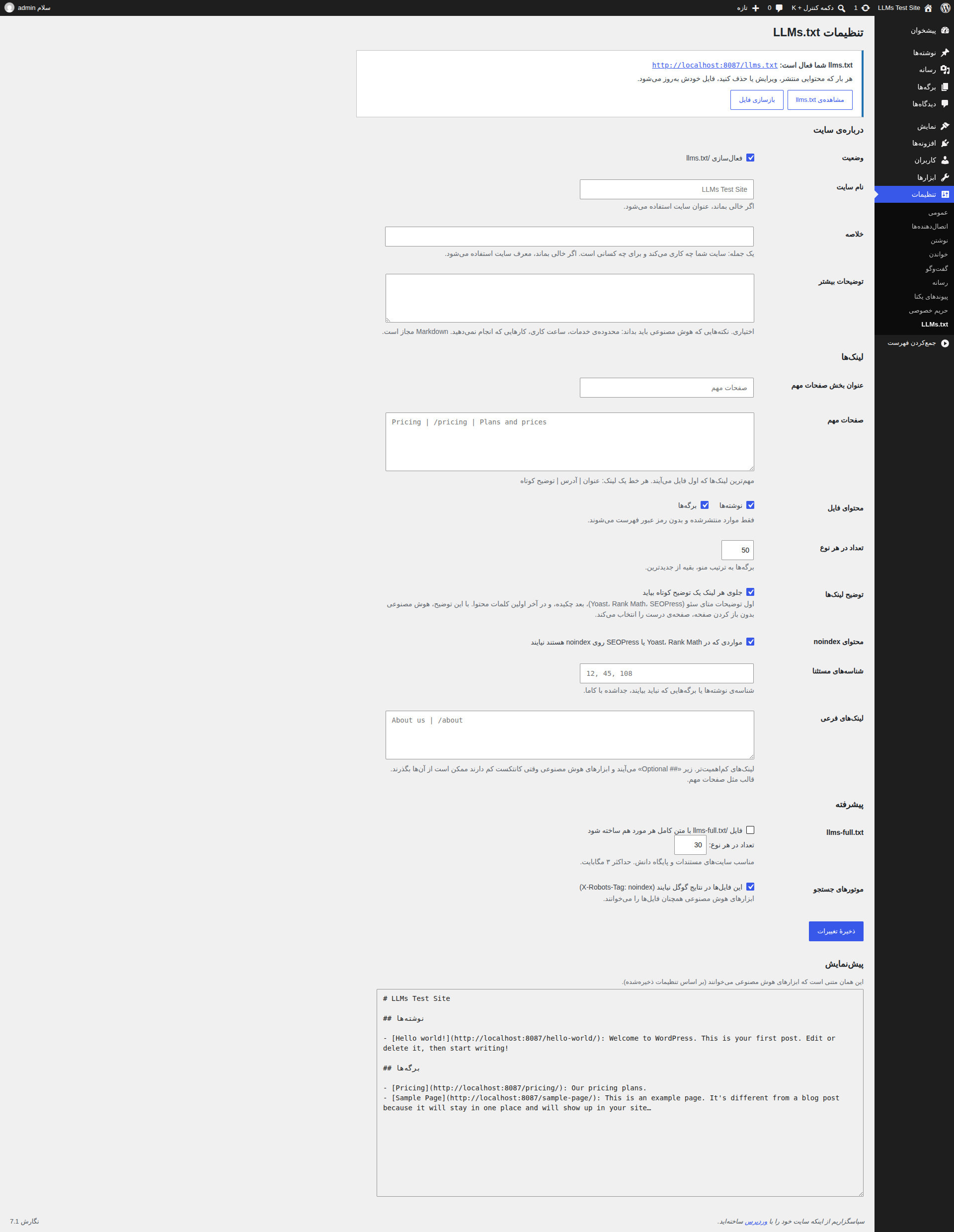
Settings → LLMs.txt, shown here with the bundled Persian translation active.
Installation
Upload and activate
From the dashboard, go to Plugins → Add New → Upload Plugin, choose the zip, then Activate.
Open the settings
Go to Settings → LLMs.txt and fill in your site info, key links, and which content types to list.
Check the output
Open yoursite.com/llms.txt. If a real llms.txt file already exists in your site root, delete it — the web server shows that file before WordPress ever runs.
How to write the links
Every link goes on its own line, in this format:
Pricing | /pricing | Plans and pricesTitle | URL | short description — exactly what "Key pages" and "Optional links" expect in the screenshot above.
About your site
- Status
- Turns /llms.txt on or off.
- Site name
- Leave empty to use your site title.
- Summary
- One sentence: what your site does and who it's for.
- More details
- Optional. Facts an AI should know: service area, working hours, what you don't offer. Markdown is allowed.
Links
- Key pages heading
- Heading for the first section of the file. Defaults to "Key pages".
- Key pages
- Your most important links, listed first — one per line, in the format above.
- Content to include
- Which post types get listed (posts, pages, ...). Only published, non-password-protected items.
- Items per type
- Cap per content type. Pages are listed in menu order; everything else newest first.
- Descriptions
- Adds a short description after each link: SEO meta description first, then excerpt, then the start of the content.
- Noindex content
- Skips items marked noindex in Yoast, Rank Math or SEOPress.
- Exclude IDs
- Post or page IDs to leave out, comma-separated.
- Optional links
- Lower-priority links, placed under "## Optional" — AI tools may skip these first when short on context.
Advanced
- llms-full.txt
- Full text of each item, converted to Markdown. Useful for docs and knowledge-base sites, capped at 3 MB.
- Search engines
- Keeps these files out of Google results (X-Robots-Tag: noindex) without blocking AI tools.
Plugin contents
Keep this folder zipped and upload it as-is from Plugins → Add New → Upload Plugin.
Filters you can hook into
llmstxt_maker_output( $text, $type )Final text; $type is 'index' or 'full'.llmstxt_maker_query_args( $args, $post_type )get_posts() arguments.llmstxt_maker_description( $desc, $post )Description for one item.llmstxt_maker_is_indexable( $bool, $post )Include or skip one item.llmstxt_maker_full_max_bytes( $bytes )Size cap for llms-full.txt.Frequently asked questions
I get "Not Found" at /llms.txt
Go to Settings → Permalinks, choose any structure other than "Plain", then save. On Nginx, make sure .txt requests that don't match a real file are passed to index.php.
My caching plugin shows an old version
Clear the page cache after changing settings, or exclude /llms.txt from caching.
Ready to install it?
Download the zip and follow the steps above. It's free, released under GPLv2.
Download plugin .zip